TYPE:
TYPE:
PRODUCT DESIGN
PRODUCT DESIGN
CLIENT:
CLIENT:
N.A. (PERSONAL PROJECT)
N.A. (PERSONAL PROJECT)
YEAR:
YEAR:
2026
2026
INDUSTRY:
INDUSTRY:
PET TECH
PET TECH
CleaningApp
CleaningApp
CleaningApp
TYPE:
PRODUCT DESIGN
CLIENT:
N.A. (PERSONAL PROJECT)
YEAR:
2026
INDUSTRY:
PET TECH
Automatic cat litter boxes take away the daily hassle, but keeping track of when to clean them still relies on memory. I designed and built a functional iOS app that removes that mental load entirely: automatically scheduling, syncing, and sharing cleaning tasks based on your preferences.
Automatic cat litter boxes take away the daily hassle, but keeping track of when to clean them still relies on memory. I designed and built a functional iOS app that removes that mental load entirely: automatically scheduling, syncing, and sharing cleaning tasks based on your preferences.
Automatic cat litter boxes take away the daily hassle, but keeping track of when to clean them still relies on memory. I designed and built a functional iOS app that removes that mental load entirely: automatically scheduling, syncing, and sharing cleaning tasks based on your preferences.
Problem
Problem
Problem
Automatic cat litter boxes take away the daily hassle, but they still need regular cleaning to keep running well and to keep your cat happy. When you don't have to think about it every day, you forget. CleaningApp started as a personal project to solve exactly that: removing the mental load and turning maintenance into a clear, scheduled routine. It also served as a playground to challenge myself to take a full iOS app from design all the way to a working product using AI.
Project Goal: Design and build a simple iOS app that removes the mental load of litter box maintenance by turning it into a clear, automated routine.
Automatic cat litter boxes take away the daily hassle, but they still need regular cleaning to keep running well and to keep your cat happy. When you don't have to think about it every day, you forget. CleaningApp started as a personal project to solve exactly that: removing the mental load and turning maintenance into a clear, scheduled routine. It also served as a playground to challenge myself to take a full iOS app from design all the way to a working product using AI.
Project Goal: Design and build a simple iOS app that removes the mental load of litter box maintenance by turning it into a clear, automated routine.
Automatic cat litter boxes take away the daily hassle, but they still need regular cleaning to keep running well and to keep your cat happy. When you don't have to think about it every day, you forget. CleaningApp started as a personal project to solve exactly that: removing the mental load and turning maintenance into a clear, scheduled routine. It also served as a playground to challenge myself to take a full iOS app from design all the way to a working product using AI.
Project Goal: Design and build a simple iOS app that removes the mental load of litter box maintenance by turning it into a clear, automated routine.
Exploration
Exploration
Exploration
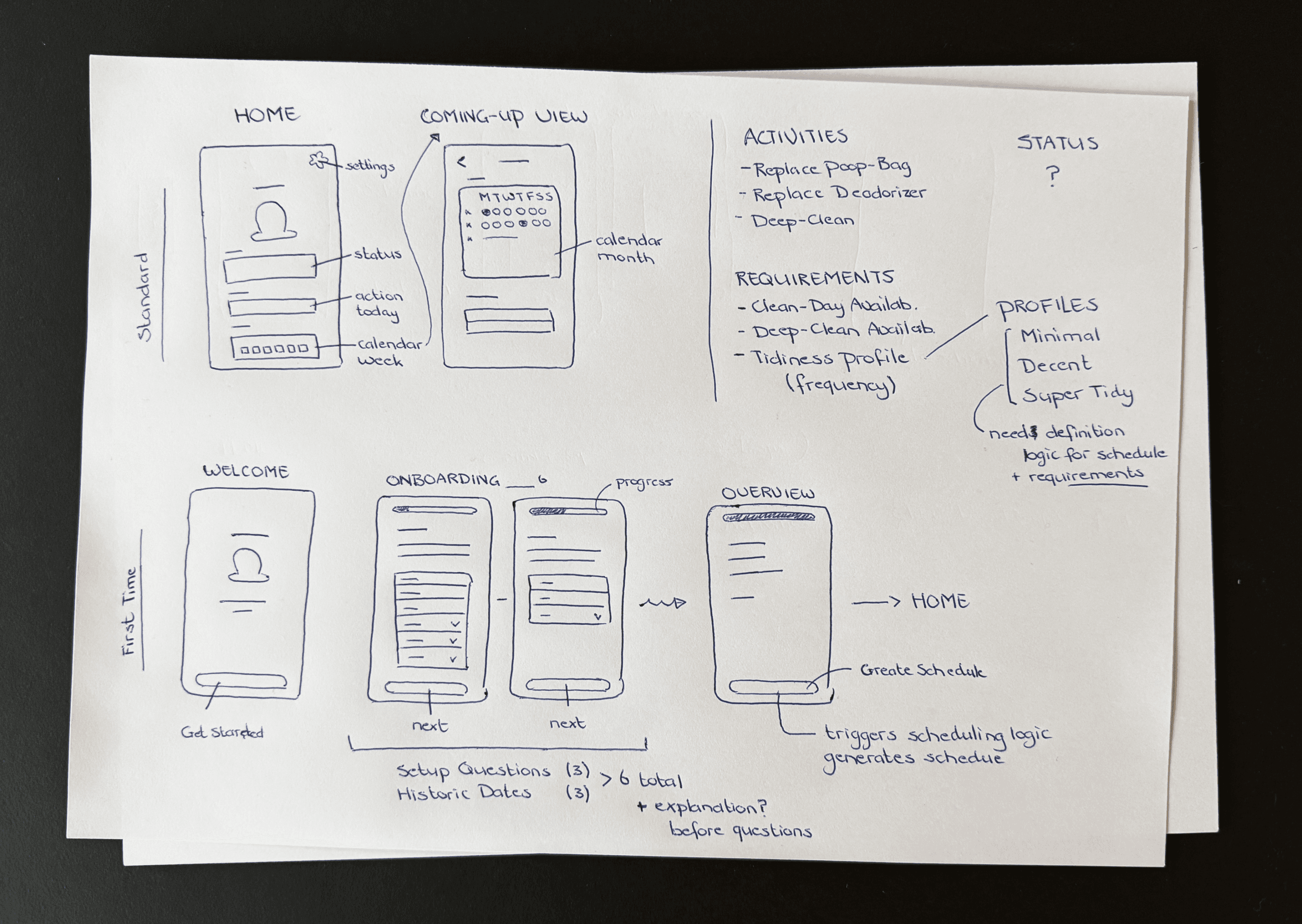
Started from a personal pain point: keeping track of when the litter box was last cleaned affected both the machine's performance and the cat's wellbeing.
Started from a personal pain point: keeping track of when the litter box was last cleaned affected both the machine's performance and the cat's wellbeing.
Started from a personal pain point: keeping track of when the litter box was last cleaned affected both the machine's performance and the cat's wellbeing.
The core idea: an app that automatically creates a cleaning schedule based on your tidiness profile, so you never have to think about when the next clean is due.
The core idea: an app that automatically creates a cleaning schedule based on your tidiness profile, so you never have to think about when the next clean is due.
The core idea: an app that automatically creates a cleaning schedule based on your tidiness profile, so you never have to think about when the next clean is due.
Looked at apps like Garmin, Strava, and ClassPass for inspiration on onboarding flows and scheduling logic.
Looked at apps like Garmin, Strava, and ClassPass for inspiration on onboarding flows and scheduling logic.
Looked at apps like Garmin, Strava, and ClassPass for inspiration on onboarding flows and scheduling logic.
The app had to be super simple and clear. At first glance, you should see the current state of the litter box and be able to log a cleaning activity with minimal effort.
The app had to be super simple and clear. At first glance, you should see the current state of the litter box and be able to log a cleaning activity with minimal effort.
The app had to be super simple and clear. At first glance, you should see the current state of the litter box and be able to log a cleaning activity with minimal effort.
INITIAL IDEA SKETCHES
INITIAL IDEA SKETCHES
INITIAL IDEA SKETCHES
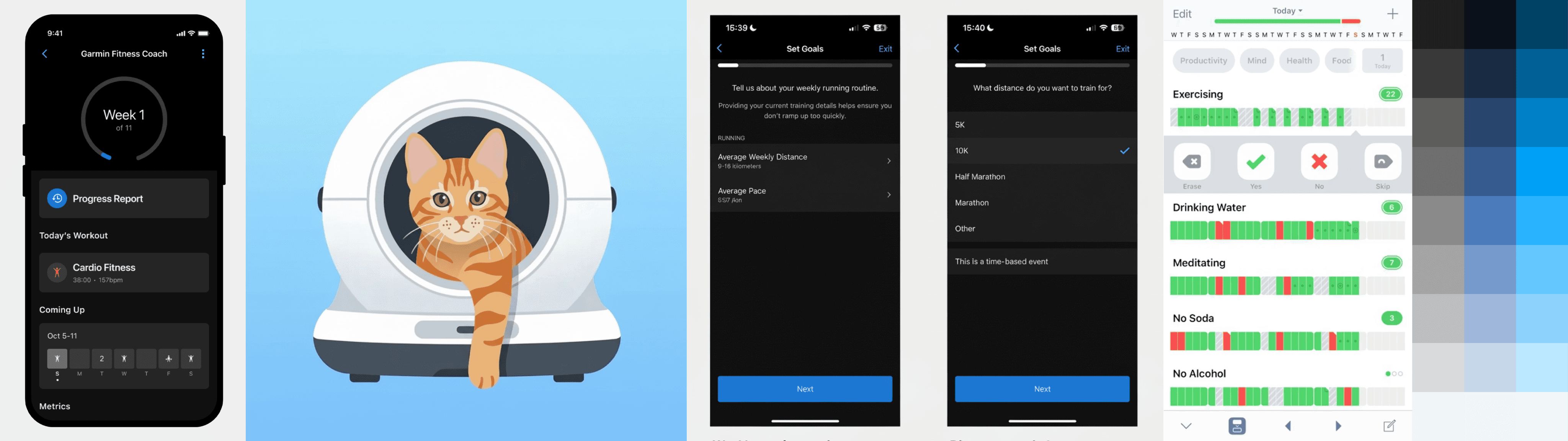
EXPLORATION
EXPLORATION
EXPLORATION
Phase I: MVP
Phase I: MVP
Phase I: MVP
The MVP focused on solving the core problem: a simple, local app that automatically generates a cleaning schedule based on your tidiness profile. When manual changes are made or cleaning preferences are updated, the schedule adjusts accordingly.
The MVP focused on solving the core problem: a simple, local app that automatically generates a cleaning schedule based on your tidiness profile. When manual changes are made or cleaning preferences are updated, the schedule adjusts accordingly.
The MVP focused on solving the core problem: a simple, local app that automatically generates a cleaning schedule based on your tidiness profile. When manual changes are made or cleaning preferences are updated, the schedule adjusts accordingly.
Approach
Approach
Approach
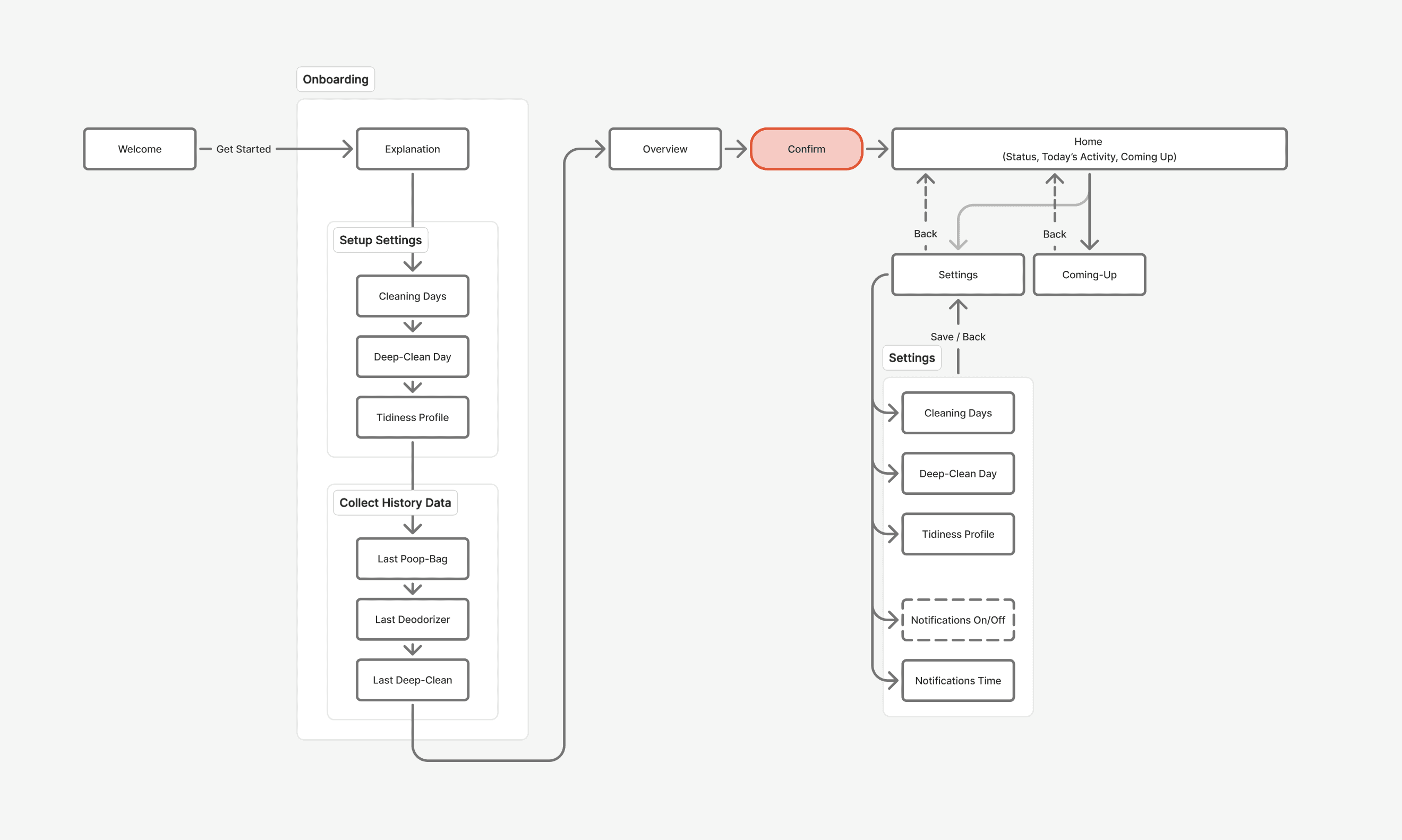
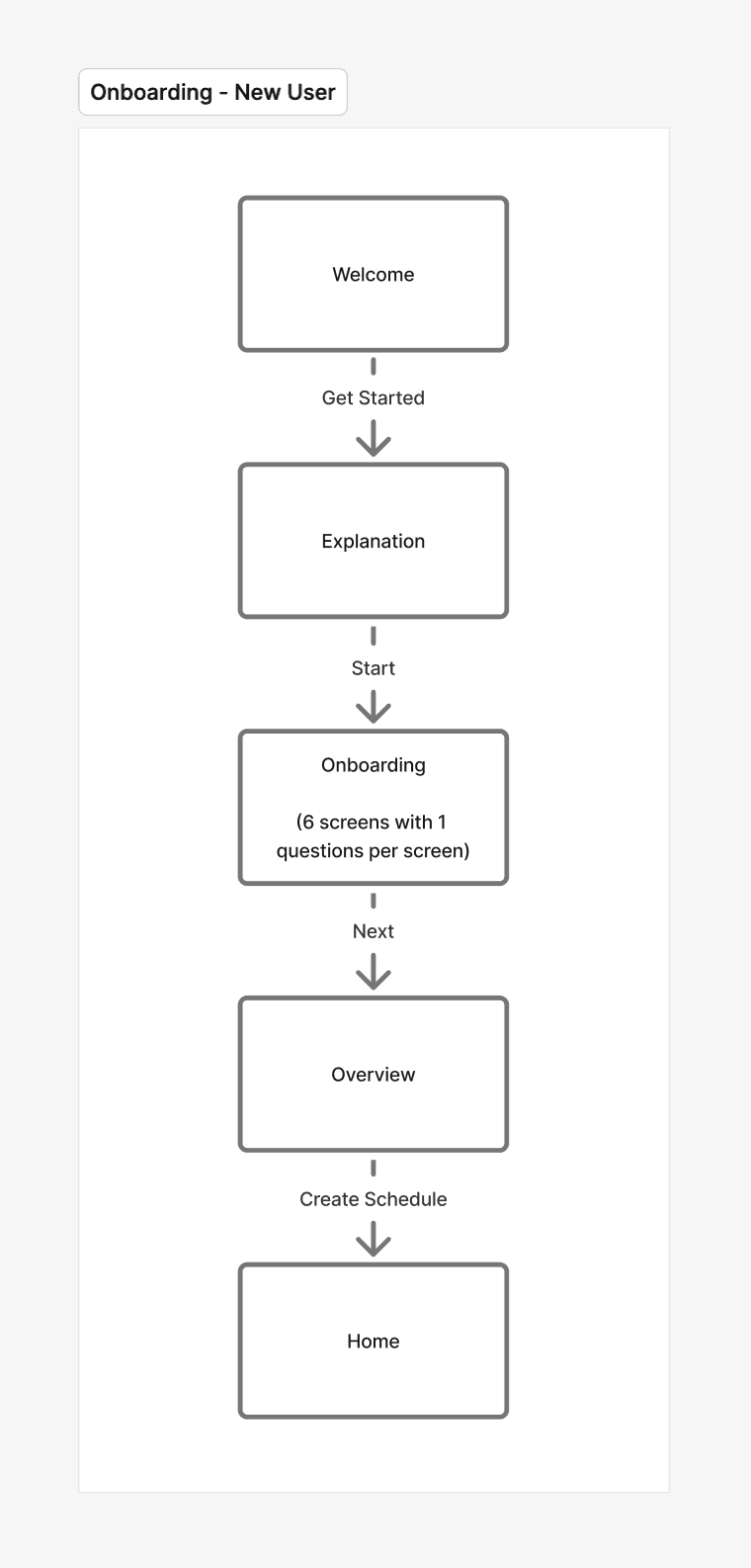
Screen Structure & User Flow Diagram: Mapped out the screen structure and user flow to identify all needed screens and their logical connections.
Screen Structure & User Flow Diagram: Mapped out the screen structure and user flow to identify all needed screens and their logical connections.
Screen Structure & User Flow Diagram: Mapped out the screen structure and user flow to identify all needed screens and their logical connections.
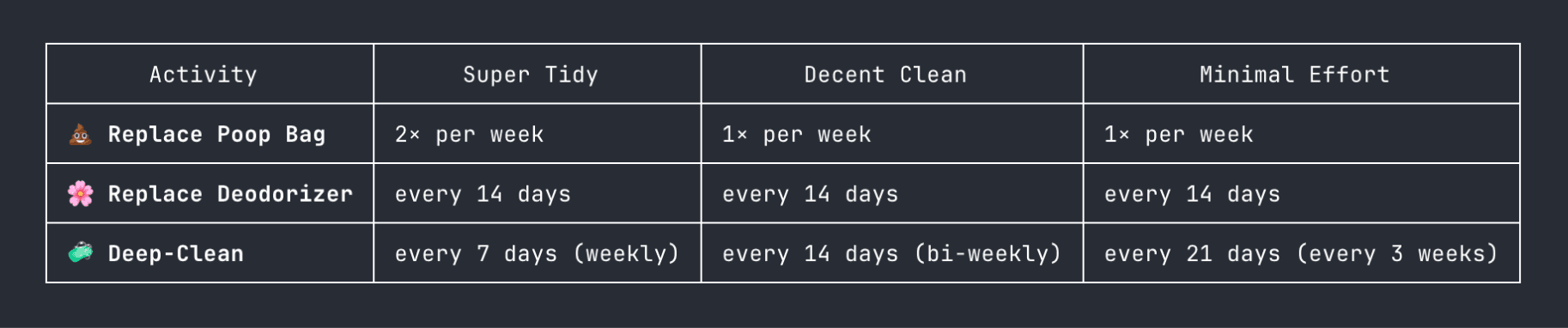
Schedule Logic: Designed the app around a tidiness profile that automatically generates a cleaning schedule. Locally stored, no account needed. This required mapping out the core requirements (e.g. activities, availability) and the underlying logic, such as tidiness profile frequencies.
Schedule Logic: Designed the app around a tidiness profile that automatically generates a cleaning schedule. Locally stored, no account needed. This required mapping out the core requirements (e.g. activities, availability) and the underlying logic, such as tidiness profile frequencies.
Schedule Logic: Designed the app around a tidiness profile that automatically generates a cleaning schedule. Locally stored, no account needed. This required mapping out the core requirements (e.g. activities, availability) and the underlying logic, such as tidiness profile frequencies.
Design & Development: Starting from the screens identified in the user flow diagram, basic UI components were designed and carefully translated into high fidelity screens. These served as the foundation for building the app in Xcode using Claude Code and the Figma MCP. Building the app was a highly iterative process, moving between designing screens, handing them to Claude Code, and testing in the simulator to verify positioning and functionality.
Design & Development: Starting from the screens identified in the user flow diagram, basic UI components were designed and carefully translated into high fidelity screens. These served as the foundation for building the app in Xcode using Claude Code and the Figma MCP. Building the app was a highly iterative process, moving between designing screens, handing them to Claude Code, and testing in the simulator to verify positioning and functionality.
Design & Development: Starting from the screens identified in the user flow diagram, basic UI components were designed and carefully translated into high fidelity screens. These served as the foundation for building the app in Xcode using Claude Code and the Figma MCP. Building the app was a highly iterative process, moving between designing screens, handing them to Claude Code, and testing in the simulator to verify positioning and functionality.
SCREEN STRUCTURE
SCREEN STRUCTURE
SCREEN STRUCTURE
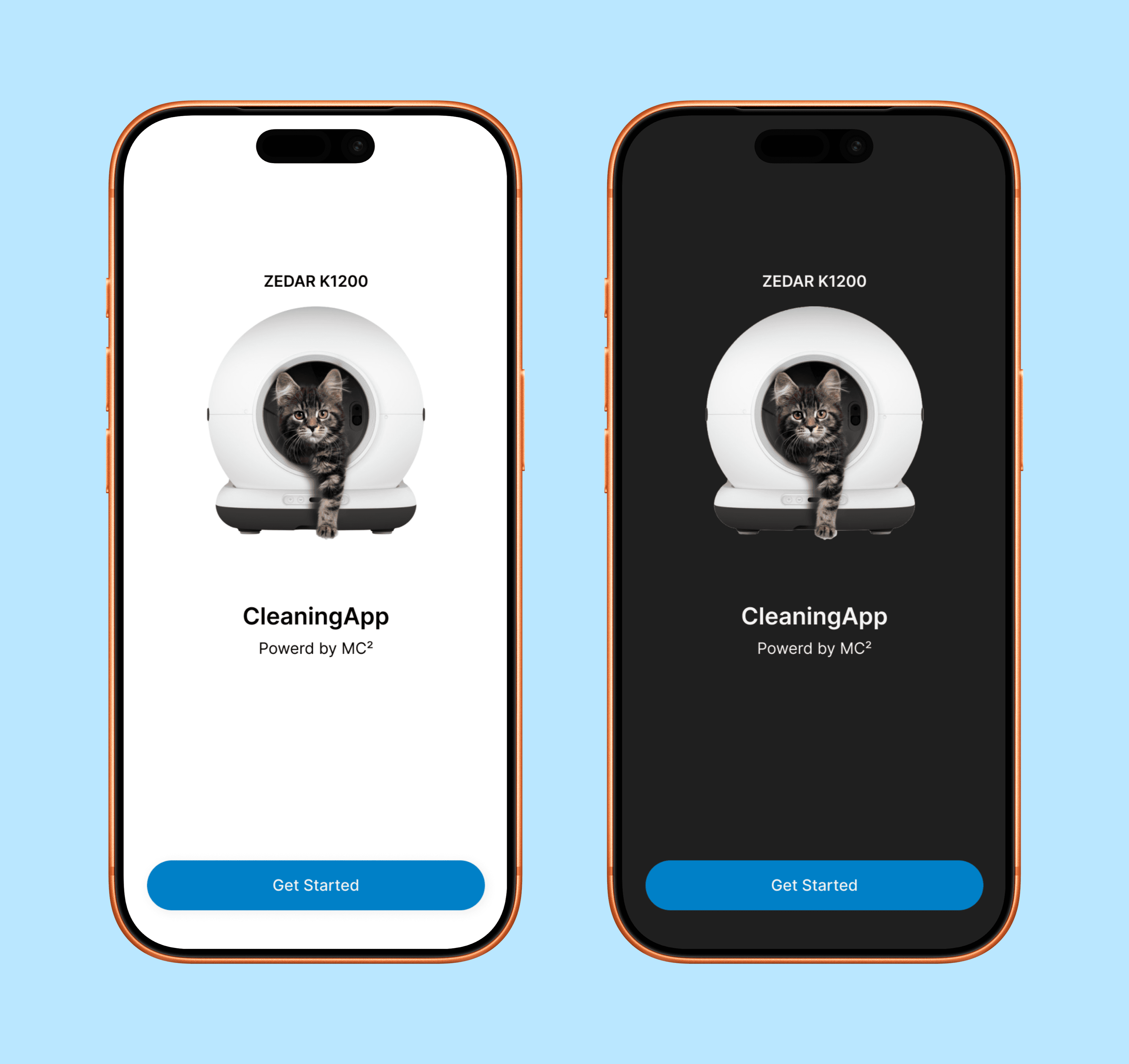
WELCOME SCREEN IN LIGHT & DARK MODE
LOGIC ACTIVITY SCHEDULE BY PROFILE
USER ONBOARDING FLOW
WELCOME SCREEN IN LIGHT & DARK MODE
WELCOME SCREEN IN LIGHT & DARK MODE
LOGIC ACTIVITY SCHEDULE BY PROFILE
LOGIC ACTIVITY SCHEDULE BY PROFILE
USER ONBOARDING FLOW
USER ONBOARDING FLOW
Challenges & Tradeoffs
Challenges & Tradeoffs
Challenges & Tradeoffs
Automation versus Flexibility: Finding the right balance between automation and control. The schedule is automatically generated for the user, but the user still needs to be able to add a manual cleaning activity, reschedule an activity on the current day, and have the schedule update accordingly. Adding these functionalities was necessary but the simplicity and automation of the app could not be lost.
Automation versus Flexibility: Finding the right balance between automation and control. The schedule is automatically generated for the user, but the user still needs to be able to add a manual cleaning activity, reschedule an activity on the current day, and have the schedule update accordingly. Adding these functionalities was necessary but the simplicity and automation of the app could not be lost.
Automation versus Flexibility: Finding the right balance between automation and control. The schedule is automatically generated for the user, but the user still needs to be able to add a manual cleaning activity, reschedule an activity on the current day, and have the schedule update accordingly. Adding these functionalities was necessary but the simplicity and automation of the app could not be lost.
Missed Activities: How to handle missed activities without overcomplicating the experience. When activities are missed, the user gets a popup on opening the app allowing them to reschedule all or dismiss. To keep things clear without adding complexity, rescheduled and missed activities are made distinguishable through labels.
Missed Activities: How to handle missed activities without overcomplicating the experience. When activities are missed, the user gets a popup on opening the app allowing them to reschedule all or dismiss. To keep things clear without adding complexity, rescheduled and missed activities are made distinguishable through labels.
Missed Activities: How to handle missed activities without overcomplicating the experience. When activities are missed, the user gets a popup on opening the app allowing them to reschedule all or dismiss. To keep things clear without adding complexity, rescheduled and missed activities are made distinguishable through labels.
Status at a Glance: Making the current state of the litter box immediately clear. The interface needed to communicate status instantly without requiring the user to dig through history or settings.
Status at a Glance: Making the current state of the litter box immediately clear. The interface needed to communicate status instantly without requiring the user to dig through history or settings.
Status at a Glance: Making the current state of the litter box immediately clear. The interface needed to communicate status instantly without requiring the user to dig through history or settings.
Schedule Continuity: Allowing the user to adjust their availability so the future schedule updates accordingly, without affecting or losing the past schedule.
Schedule Continuity: Allowing the user to adjust their availability so the future schedule updates accordingly, without affecting or losing the past schedule.
Schedule Continuity: Allowing the user to adjust their availability so the future schedule updates accordingly, without affecting or losing the past schedule.
Results
Results
Results
App Design: Designed a fully functional iOS app covering every screen from onboarding to daily use. Most important functionalities:
App Design: Designed a fully functional iOS app covering every screen from onboarding to daily use. Most important functionalities:
App Design: Designed a fully functional iOS app covering every screen from onboarding to daily use. Most important functionalities:
Onboarding: A smooth and focused onboarding flow that gives the user the right context without anything redundant, generating the correct cleaning schedule based on the inputted requirements and defined logic upon completion.
Onboarding: A smooth and focused onboarding flow that gives the user the right context without anything redundant, generating the correct cleaning schedule based on the inputted requirements and defined logic upon completion.
Onboarding: A smooth and focused onboarding flow that gives the user the right context without anything redundant, generating the correct cleaning schedule based on the inputted requirements and defined logic upon completion.
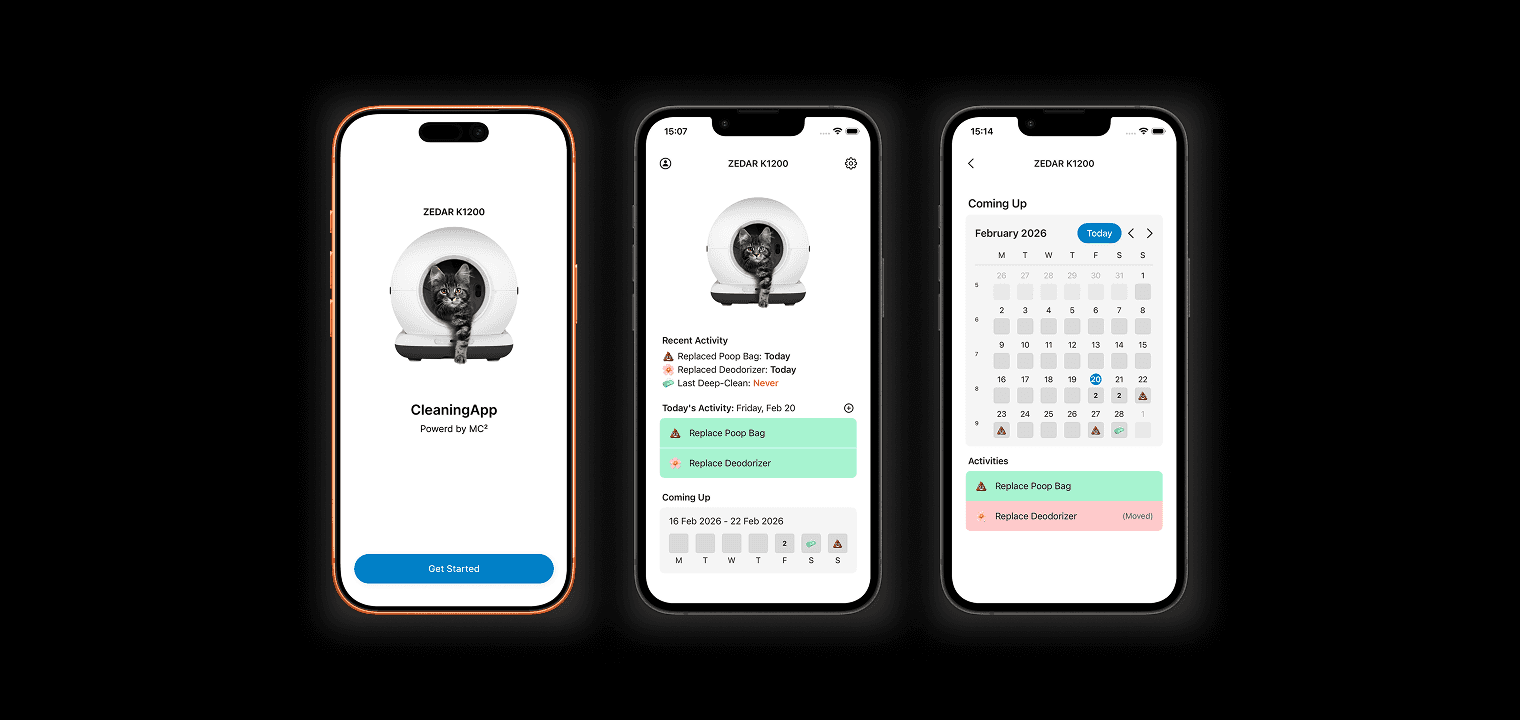
Home Screen: A clean overview that communicates the current status of the device, today's scheduled activities, and an overview of the current week.
Home Screen: A clean overview that communicates the current status of the device, today's scheduled activities, and an overview of the current week.
Home Screen: A clean overview that communicates the current status of the device, today's scheduled activities, and an overview of the current week.
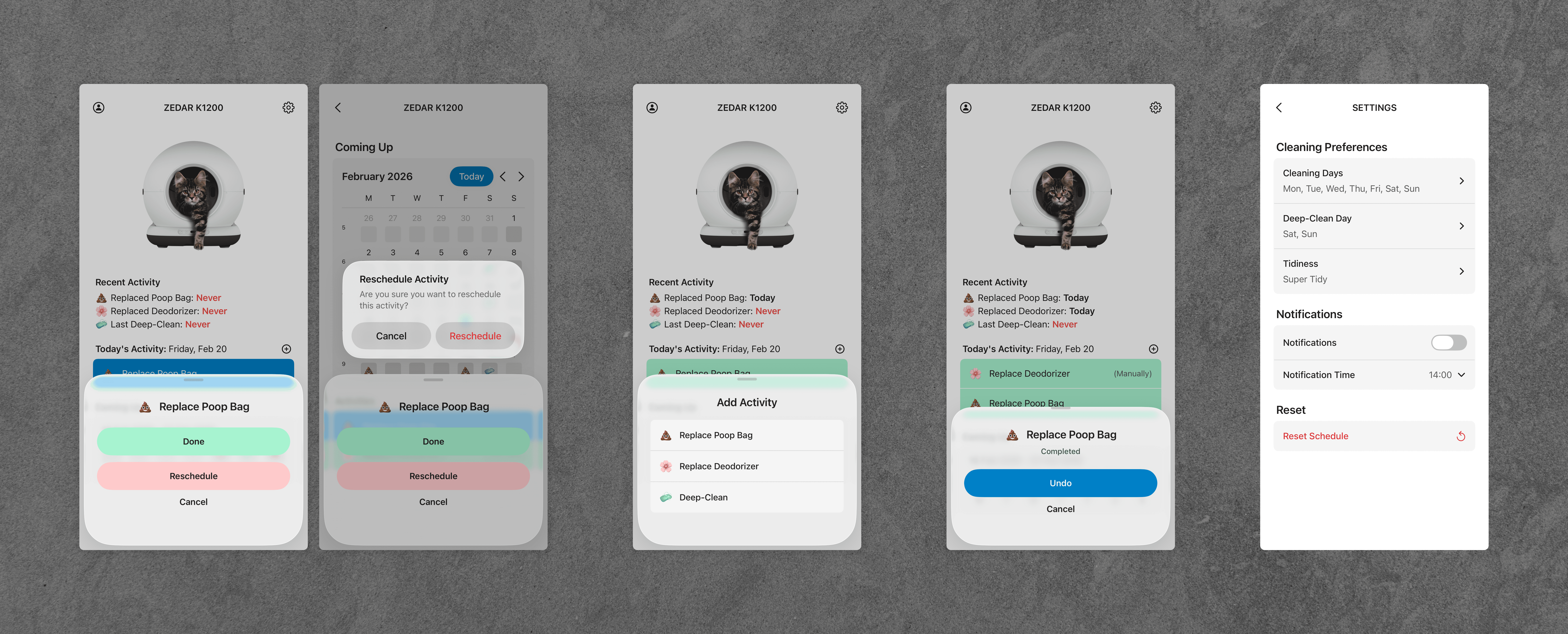
Activity Management: Activities can be selected and rescheduled, marked as done, or dismissed in a minimal number of clicks.
Activity Management: Activities can be selected and rescheduled, marked as done, or dismissed in a minimal number of clicks.
Activity Management: Activities can be selected and rescheduled, marked as done, or dismissed in a minimal number of clicks.
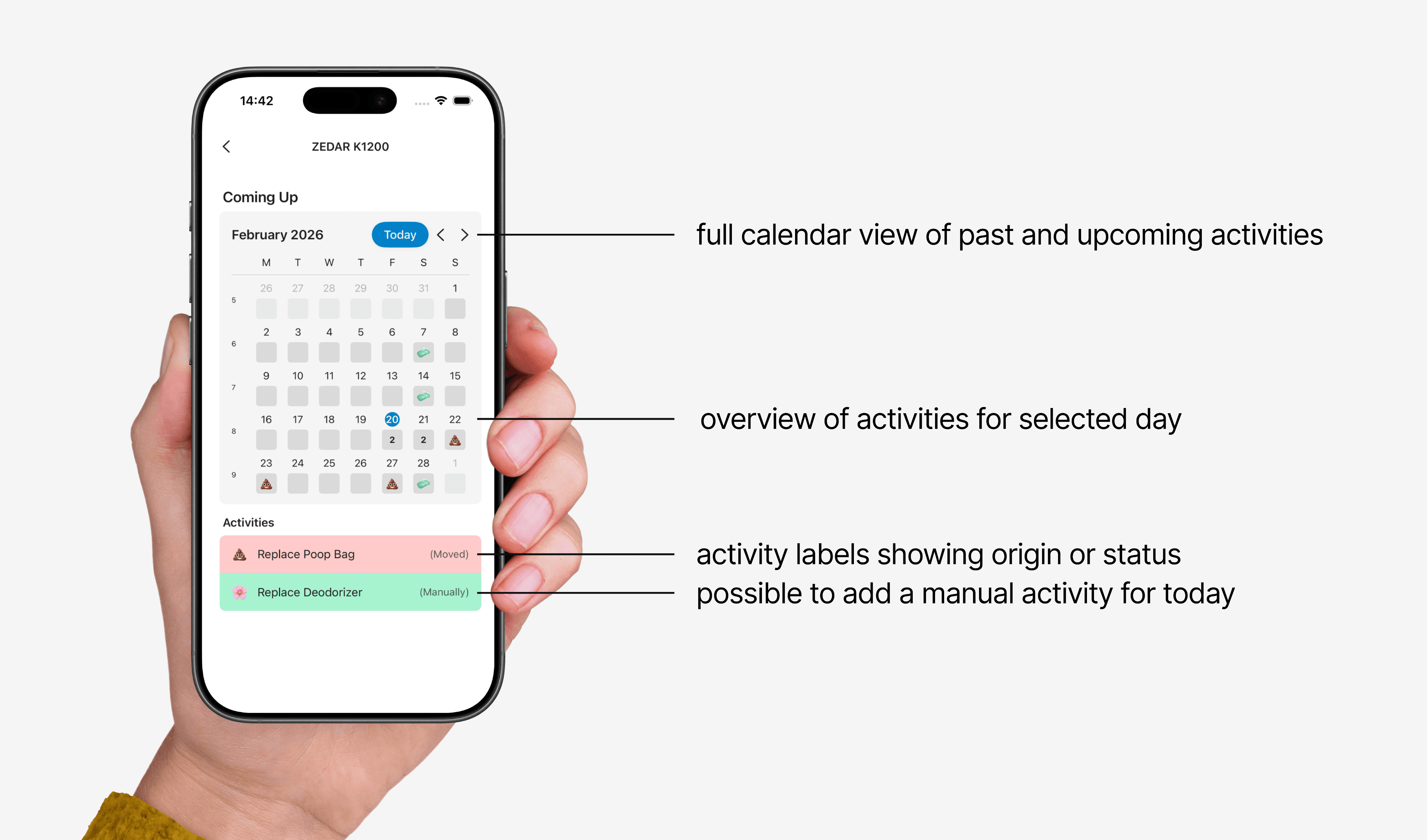
Calendar: The Coming Up calendar view shows all past and future activities.
Calendar: The Coming Up calendar view shows all past and future activities.
Calendar: The Coming Up calendar view shows all past and future activities.
Adjustable Settings: In settings, the user can adjust their availability and the future schedule updates automatically while past activities remain untouched.
Adjustable Settings: In settings, the user can adjust their availability and the future schedule updates automatically while past activities remain untouched.
Adjustable Settings: In settings, the user can adjust their availability and the future schedule updates automatically while past activities remain untouched.
Light & Dark Mode: The app is fully designed in both light and dark mode, adapting to the user's system preference.
Light & Dark Mode: The app is fully designed in both light and dark mode, adapting to the user's system preference.
Light & Dark Mode: The app is fully designed in both light and dark mode, adapting to the user's system preference.
Fully Functional App: Built entirely in Xcode using Claude Code, it is functional and available for testing via TestFlight (iOS only).
Fully Functional App: Built entirely in Xcode using Claude Code, it is functional and available for testing via TestFlight (iOS only).
Fully Functional App: Built entirely in Xcode using Claude Code, it is functional and available for testing via TestFlight (iOS only).
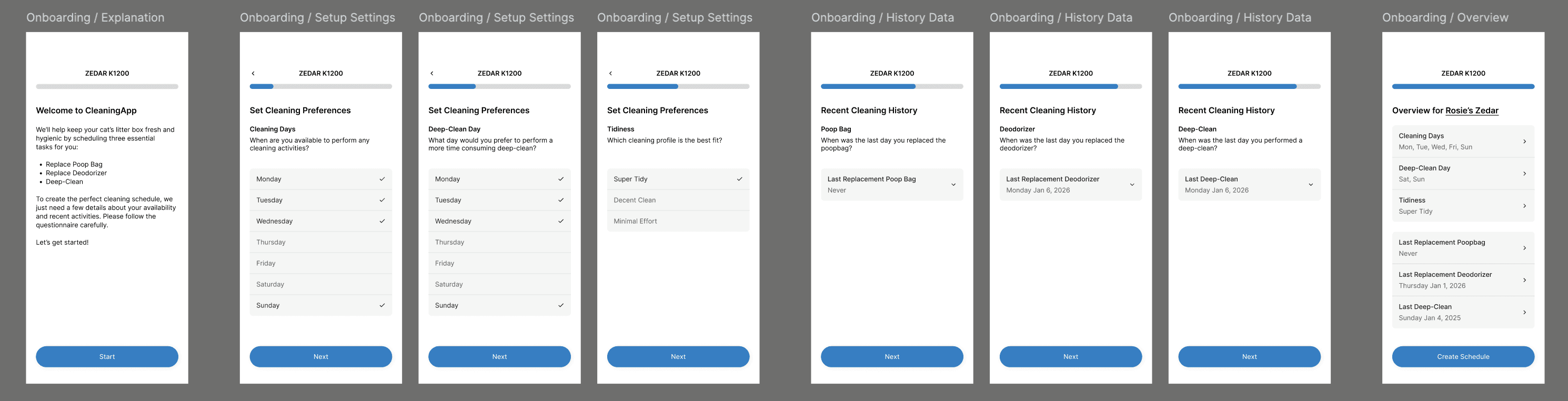
ONBOARDING SCREENS
ONBOARDING SCREENS
ONBOARDING SCREENS
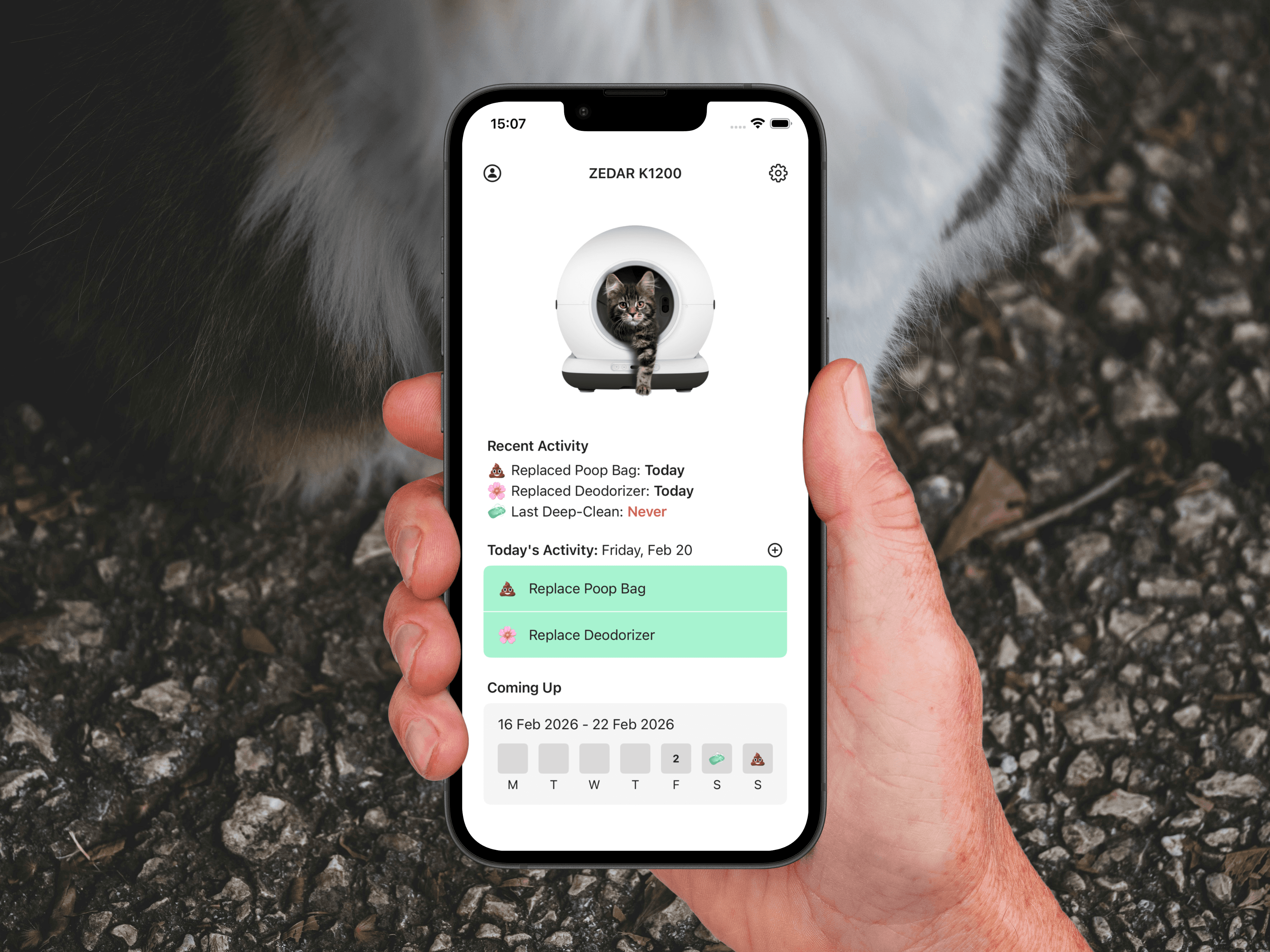
HOME
FIRST USE TOOLTIPS
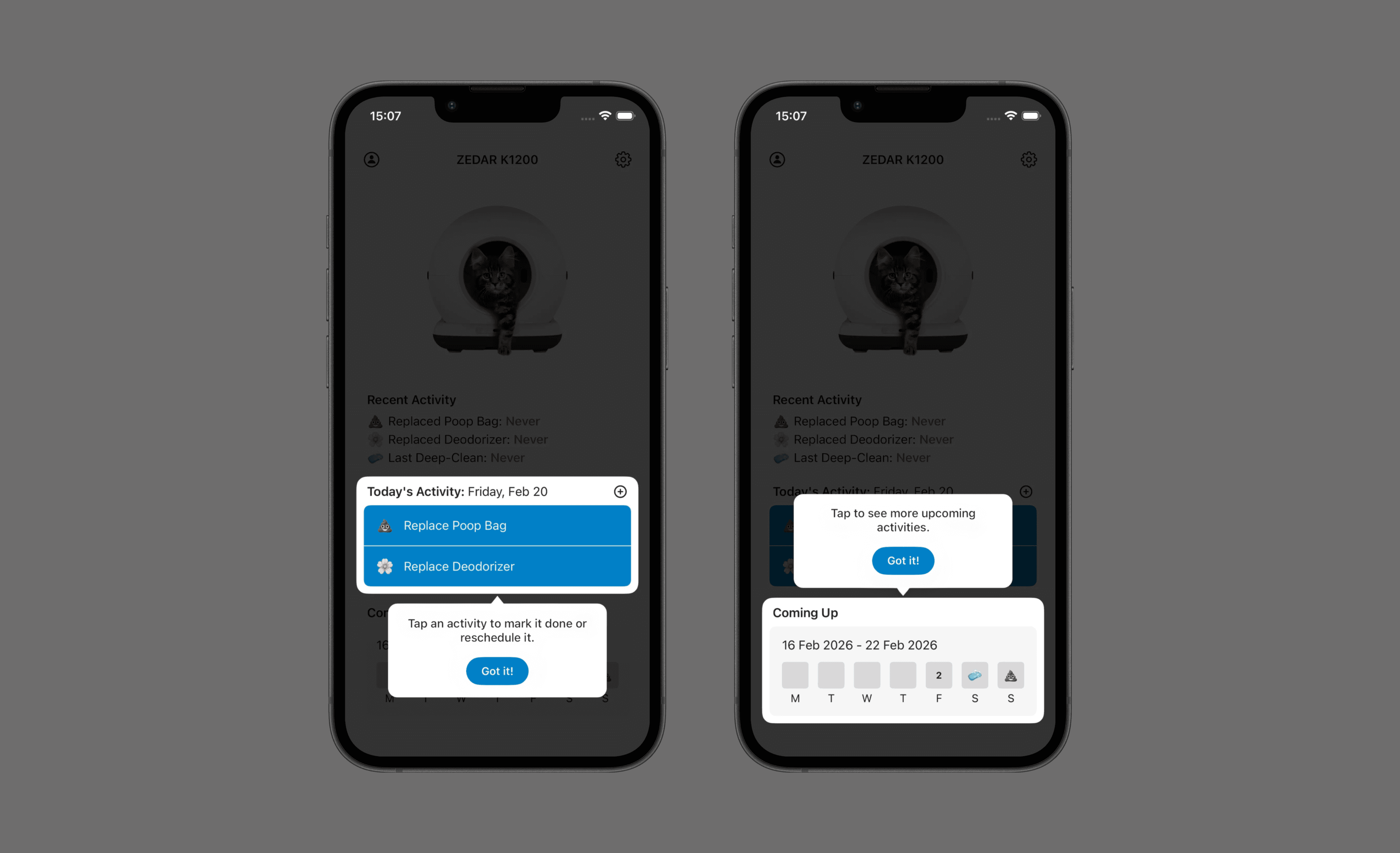
COMING UP VIEW
KEY FUNCTIONALITIES LEFT TO RIGHT:
MANAGE ACTIVITY (DONE OR RESCHEDULE), ADD MANUALLY, UNDO, AND SETTINGS
DEMO OF ONBOARDING AND FUNCTIONALITIES
HOME
HOME
FIRST USE TOOLTIPS
FIRST USE TOOLTIPS
COMING UP VIEW
COMING UP VIEW
KEY FUNCTIONALITIES LEFT TO RIGHT:
MANAGE ACTIVITY (DONE OR RESCHEDULE), ADD MANUALLY, UNDO, AND SETTINGS
KEY FUNCTIONALITIES LEFT TO RIGHT:
MANAGE ACTIVITY (DONE OR RESCHEDULE), ADD MANUALLY, UNDO, AND SETTINGS
Phase II: Sync & Share Feature
Phase II: Sync & Share Feature
Phase II: Sync & Share Feature
After completing the MVP, sharing across devices and with other people was a natural next step. When two people share a cat, or when a user wants to access their schedule across multiple devices, a shared view is needed. Phase 2 introduces Sync & Share: a feature that lets users save their device to the cloud and share access with others in real time, without losing the simplicity of the original app.
This phase is still in construction. I'll update the case study as soon as it's finished!
After completing the MVP, sharing across devices and with other people was a natural next step. When two people share a cat, or when a user wants to access their schedule across multiple devices, a shared view is needed. Phase 2 introduces Sync & Share: a feature that lets users save their device to the cloud and share access with others in real time, without losing the simplicity of the original app.
This phase is still in construction. I'll update the case study as soon as it's finished!